

Business chatbots are becoming an important solution for organizations that want to improve customer support while reducing repetitive workloads. Customers increasingly expect quick responses when they have questions about products, services, orders, payments, accounts, or business processes. Handling every routine inquiry manually can place significant pressure on support teams and make it difficult to maintain consistent response times.
Business chatbots can help address this challenge by automatically responding to common questions and guiding customers toward relevant information. Instead of requiring employees to answer the same questions repeatedly, chatbot systems can manage routine conversations and allow support representatives to focus on more complex issues.
What Are Business Chatbots?
Business chatbots are software systems designed to communicate with customers through automated conversations. They can answer frequently asked questions, provide information, collect basic details, guide users through processes, and direct complex inquiries to human representatives.
Depending on the system, chatbots may use predefined rules, natural language processing, artificial intelligence, or combinations of these technologies. Their capabilities can range from answering simple questions to supporting more sophisticated customer service workflows.
How Business Chatbots Work
A chatbot receives a customer’s message and analyzes the request to determine an appropriate response. Depending on its configuration, it may retrieve information from a knowledge base, follow a predefined conversation path, or use AI-based language understanding.
If the request falls within the chatbot’s capabilities, it can provide an immediate response. When the issue requires human judgment, the chatbot can transfer the conversation to an appropriate support representative.
Common Customer Support Tasks
Business chatbots can handle many repetitive support activities. These may include answering frequently asked questions, explaining product information, providing business hours, checking basic order details, collecting customer information, and directing users to relevant resources.
Automating these routine interactions can reduce the number of simple requests reaching human agents. This allows support teams to dedicate more time to inquiries that require detailed investigation or personalized assistance.
How Business Chatbots Reduce Support Workloads
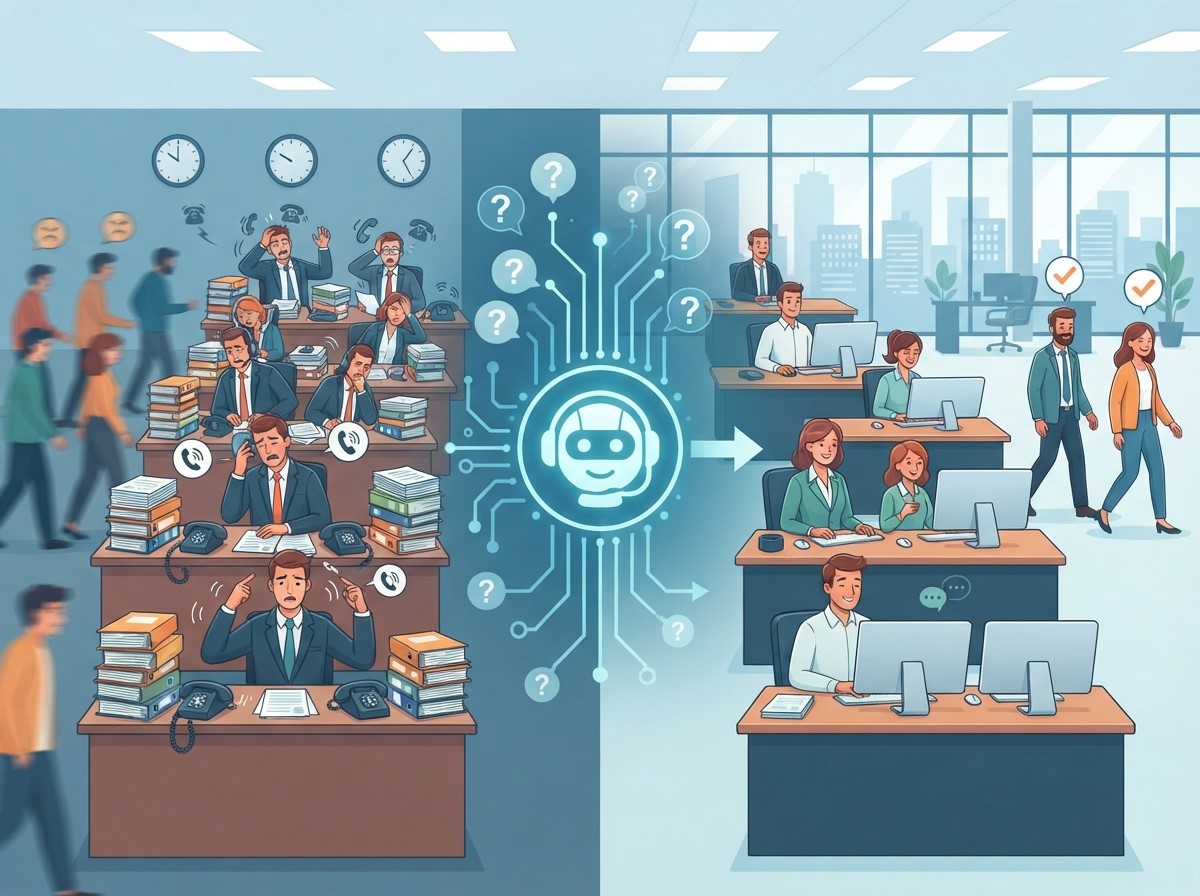
Business chatbots can take over many of these repetitive interactions. By providing immediate answers to common questions, they can reduce the workload associated with routine inquiries and help teams manage customer communication more efficiently.
Automating Repetitive Questions
Frequently asked questions are among the easiest support tasks to automate. A chatbot can provide answers about shipping, returns, pricing, account processes, availability, and other common topics.
Once these responses are configured and maintained, customers can access information without waiting for an employee. Support agents can therefore spend less time repeating standard information and more time handling complex cases.
Managing Initial Customer Inquiries
A chatbot can act as the first point of contact for customers. It can ask basic questions to understand the issue and collect relevant information before transferring the conversation to a human agent.
This initial screening can help support teams receive better-organized inquiries. Agents may already know the customer’s concern and relevant details before beginning the conversation, reducing unnecessary back-and-forth communication.
The Role of Chatbot Technology in Customer Service
Chatbot technology has developed beyond simple scripted question-and-answer systems. Modern solutions can understand different ways of expressing similar requests and provide responses based on conversational context.
The level of sophistication depends on the platform and implementation. Businesses should select technology according to their support requirements rather than assuming that every chatbot needs advanced artificial intelligence.
Rule-Based Chatbots
Rule-based chatbots follow predefined instructions and conversation paths. They are useful for predictable questions and structured processes where businesses know the common customer requests in advance.
These systems can be easier to control because responses are based on established rules. They can work particularly well for frequently asked questions, basic navigation, and straightforward customer service workflows.
AI-Powered Chatbots
AI-powered chatbots can use natural language processing and machine learning techniques to interpret customer requests more flexibly. Instead of requiring customers to use exact phrases, these systems may recognize different expressions of similar questions.
AI capabilities can be useful when customer conversations are more varied. However, businesses still need appropriate knowledge sources, monitoring, testing, and escalation processes to maintain response quality.
How Chatbot Integration Connects Support Systems
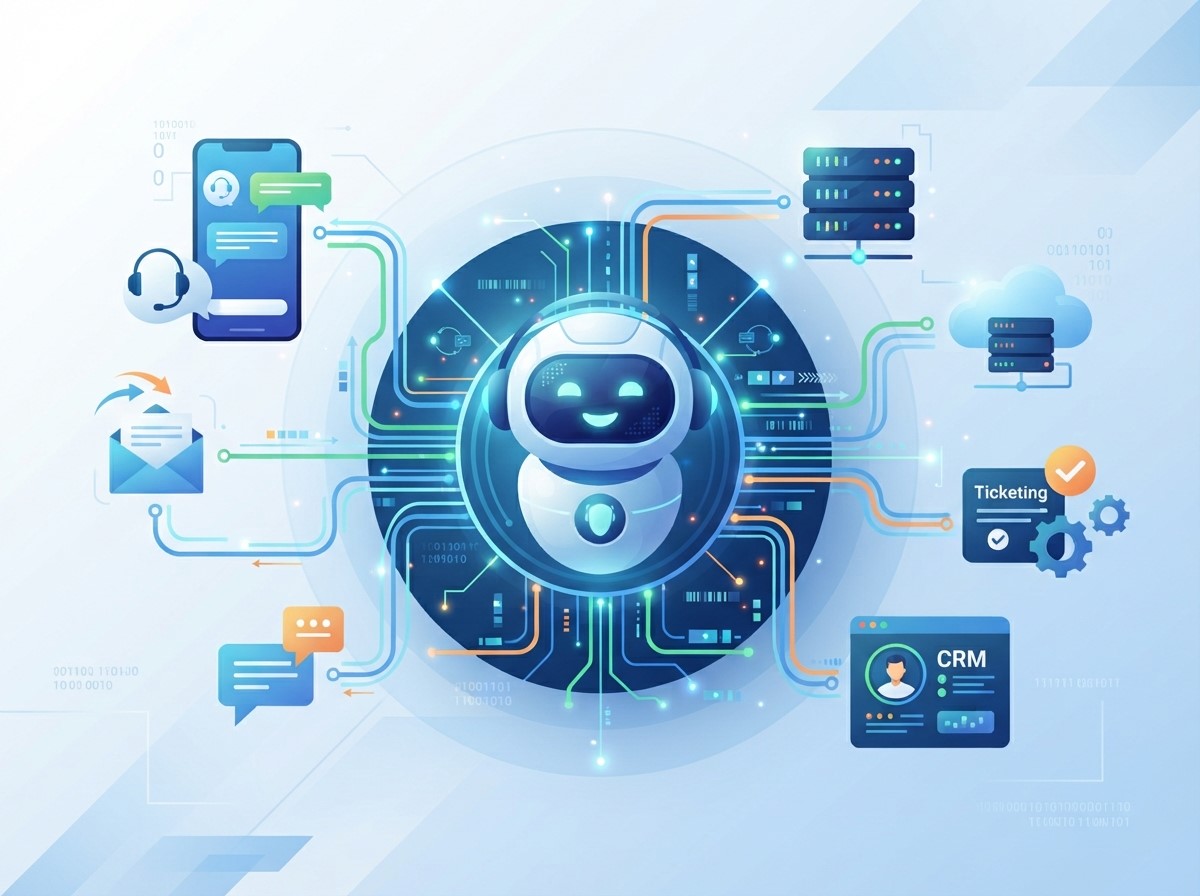
Connected systems can give chatbots access to relevant information and help support teams maintain smoother workflows.
Connecting Customer Information
When appropriate permissions and integrations are available, chatbots can use customer information to provide more relevant assistance. For example, a chatbot may help users navigate account-related questions or retrieve information from connected systems.
Businesses should apply appropriate privacy and security controls when handling customer information. Access should be limited to the information necessary for the intended support function.
Integrating With Help Desk Platforms
Connecting chatbots with help desk systems can make escalation more efficient. When a chatbot cannot resolve an issue, the conversation can be transferred to a support team along with relevant information.
This can reduce the need for customers to repeat their questions. Agents can review the existing conversation and continue from the point where automated support ended.
Using Chatbot Automation for Routine Support
Chatbot automation allows businesses to create predefined workflows for common customer interactions. These workflows can guide customers through specific steps and provide relevant information without requiring continuous employee involvement.
Automation is particularly useful for predictable tasks. However, businesses should design clear escalation paths so customers can reach human representatives when automated responses are insufficient.
Automating Basic Customer Requests
Businesses can automate requests such as business information, product questions, appointment inquiries, order guidance, and basic troubleshooting. The exact tasks depend on the organization’s services and customer needs.
Automating these interactions can help reduce repetitive workload while providing customers with immediate access to basic information.
Routing Complex Conversations
Not every customer problem should be automated. Billing disputes, complicated technical issues, sensitive complaints, or unusual requests may require human involvement.
A well-designed chatbot can identify situations that exceed its capabilities and route them to the appropriate support team. This combination of automation and human assistance can create a more balanced support process.
Improving Customer Response Times
Customers often become frustrated when they have to wait for simple answers. Business chatbots can provide immediate responses to supported questions, reducing the waiting time associated with routine inquiries.
Faster initial responses can improve the overall support experience while allowing employees to focus on conversations that require more attention.
Providing 24/7 Basic Support
Unlike human support teams that may operate according to specific schedules, chatbots can provide automated assistance around the clock. Customers can therefore receive basic information outside normal business hours.
This does not mean every issue can be resolved automatically. Instead, the chatbot can provide immediate guidance and collect information until human assistance becomes available.
Reducing Support Queues
When a chatbot resolves routine questions before they reach human agents, fewer simple conversations may enter the support queue. This can help reduce pressure during periods of high customer activity.
Shorter queues can also allow agents to spend more time on individual cases rather than rushing through a large number of repetitive requests.
Improving Support Team Productivity
Reducing repetitive work can help customer support employees focus on tasks that require judgment, empathy, investigation, and problem-solving. This can make human support interactions more meaningful.
Chatbots should therefore be viewed as tools that assist support teams rather than automatically replacing human representatives. The most effective approach depends on combining automation with appropriate human oversight.
Supporting Human Agents
Chatbots can assist agents by collecting preliminary information before escalation. They may identify the customer’s issue, gather relevant details, and provide basic resources.
This preparation can reduce the time agents spend gathering information. Representatives can then focus on diagnosing the issue and delivering an appropriate solution.
Prioritizing Complex Issues
Automated systems can help separate routine questions from more complicated cases. When straightforward requests are handled automatically, support teams can devote more attention to customers who need detailed assistance.
Prioritization can be particularly useful during busy periods when support teams experience unusually high volumes of inquiries.
Building an Effective Chatbot Support Strategy
Implementing a chatbot successfully requires more than adding a chat window to a website. Businesses need to understand customer needs, identify suitable automation opportunities, prepare reliable information, and establish clear escalation procedures.
A strategic approach can help ensure that automation improves the support experience rather than creating additional frustration.
Identify Repetitive Support Tasks
Businesses should review customer support conversations to identify questions that appear frequently. These repetitive requests are often strong candidates for automation.
Analyzing support tickets, chat histories, emails, and frequently asked questions can help identify where chatbot automation may provide the greatest operational benefit.
Create Clear Escalation Rules
Customers should have a clear path to human assistance when necessary. Escalation rules can determine when the chatbot should transfer a conversation based on complexity, customer request, or specific keywords.
A transparent escalation process prevents customers from becoming trapped in repetitive automated responses when they need human help.
Maintaining Chatbot Accuracy and Quality
Chatbot performance depends heavily on the quality of its information and configuration. Outdated answers, broken workflows, and incomplete knowledge can create poor customer experiences.
Businesses should regularly review chatbot conversations and update responses based on new products, policies, services, and recurring customer questions.
Monitor Chatbot Conversations
Monitoring conversations can reveal where customers receive useful answers and where the chatbot struggles. Businesses can identify unanswered questions, repeated requests, and conversations that frequently require escalation. These insights can guide improvements to chatbot knowledge and workflows.
Update Information Regularly
Customer support information can change over time. Pricing, product availability, policies, contact details, and procedures may need regular updates.
Maintaining accurate information helps prevent the chatbot from providing outdated responses. Regular reviews should therefore be part of the chatbot management process.
Common Challenges of Business Chatbots
Although chatbots can reduce support workloads, they also have limitations. Poorly designed systems may misunderstand questions, provide irrelevant responses, or make it difficult for customers to reach human agents.
Businesses should recognize these limitations when planning automation. The goal should be to automate appropriate tasks while maintaining a reliable customer support experience.
Avoiding Over-Automation
Automating every interaction can make customer support feel impersonal. Some situations require empathy, negotiation, detailed reasoning, or human judgment. Businesses should identify which tasks are suitable for automation and which should remain primarily human-led.
Protecting Customer Information
Chatbots may interact with customer information, making security and privacy important considerations. Businesses should apply appropriate access controls, data-handling practices, and security measures. Only necessary information should be collected and processed for the intended support purpose.
Measuring the Impact of Chatbot Automation
Businesses should measure chatbot performance to determine whether automation is actually reducing workload and improving customer service. Useful metrics can include automated resolution rates, escalation rates, response times, customer satisfaction, support ticket volume, and agent workload.
Measurement should focus on both operational efficiency and customer experience. A chatbot that handles many conversations but produces poor customer outcomes may require significant improvement.
Tracking Resolution Rates
Resolution rate measures how many customer inquiries are successfully handled without additional human intervention. A higher rate may indicate that the chatbot is effective for its intended use cases.
However, businesses should also verify whether customers were genuinely satisfied with the automated resolution.
Measuring Agent Workload
Businesses can compare support ticket volumes and average handling times before and after chatbot implementation. These measurements can help determine whether automation is reducing repetitive work.
Agent feedback is also valuable because employees can identify workflow improvements that may not appear in numerical metrics alone.
The Future of Business Chatbots

However, human involvement will remain important for situations requiring empathy, judgment, negotiation, or specialized expertise. The future of customer support is likely to involve collaboration between automated systems and human teams rather than relying exclusively on either approach.
Conclusion
Business chatbots can reduce customer support workloads by handling repetitive questions, providing immediate information, collecting preliminary details, and directing complex cases to human representatives. When implemented strategically, they can help businesses manage support demand while maintaining faster communication.
Modern Chatbot technology provides different options for businesses, from simple rule-based systems to more advanced AI-powered solutions. Through effective Chatbot integration, these systems can connect with support platforms and other business tools. Meanwhile, Chatbot automation can streamline repetitive workflows and reduce unnecessary manual tasks.
Frequently Asked Questions
1. What are business chatbots?
Business chatbots are software systems that communicate with customers through automated conversations. They can answer common questions, provide information, collect basic details, guide users through processes, and transfer complex inquiries to human support representatives.
2. How do business chatbots reduce customer support workloads?
Business chatbots reduce workloads by handling repetitive inquiries automatically. They can answer frequently asked questions, provide basic information, collect customer details, and manage simple support processes without requiring continuous involvement from human agents.
3. What is chatbot automation?
Chatbot automation is the use of automated workflows to manage customer conversations and repetitive support tasks. It allows businesses to create predefined processes for common inquiries while providing escalation options when human assistance is needed.
4. What is chatbot integration?
Chatbot integration connects a chatbot with other business systems, such as help desks, customer relationship management platforms, knowledge bases, order systems, or messaging channels. Integration can help chatbots provide more relevant information and support smoother workflows.
5. Can chatbots provide 24/7 customer support?
Yes. Chatbots can provide automated assistance around the clock. They can answer supported questions outside normal business hours, collect information, and provide basic guidance until human support becomes available.
6. Can business chatbots replace human customer support agents?
Chatbots can automate many repetitive tasks, but they do not replace human support for every situation. Complex problems, sensitive complaints, unusual requests, and issues requiring empathy or judgment may still require human representatives.
7. What type of questions can a business chatbot answer?
A chatbot can answer frequently asked questions about products, services, pricing, business hours, basic policies, order processes, account guidance, and other predefined topics. Its capabilities depend on its design, data, integrations, and configuration.
8. How can businesses improve chatbot performance?
Businesses can improve chatbot performance by analyzing conversations, updating knowledge regularly, identifying unanswered questions, testing workflows, monitoring escalation rates, and collecting customer feedback. Regular maintenance is important for keeping responses accurate and useful.
9. Are business chatbots suitable for small businesses?
Yes. Small businesses can use chatbots to handle common questions, provide basic information, collect leads, and support customers outside regular working hours. The chatbot should be selected according to the business’s actual support needs and available resources.
10. How should businesses measure chatbot success?
Businesses can measure chatbot success using metrics such as resolution rate, response time, escalation rate, customer satisfaction, support ticket volume, and agent workload. Combining operational metrics with customer feedback provides a more complete view of performance.





How AI Virtual Assistants Improve Time Management
How Business Chatbots Reduce Customer Support Workloads
How Lead Generation Chatbots Improve Sales Opportunities
How Chatbot Integration Improves Business Efficiency