

Businesses are continuously looking for ways to improve productivity, reduce repetitive work, and provide faster customer service. Chatbot integration has become an effective approach for achieving these goals by connecting intelligent conversational tools with websites, customer support platforms, messaging channels, and business systems.
Instead of requiring employees to manually answer every routine question, integrated chatbots can handle common requests automatically. They can provide information, collect customer details, guide users through basic processes, and transfer complex issues to human representatives when necessary.
Modern Chatbot technology has also developed beyond simple scripted responses. Advanced systems can understand natural language, identify customer intent, maintain conversational context, and provide more relevant responses.
What Is Chatbot Integration?
Chatbot integration refers to connecting a chatbot with existing digital platforms, business systems, and communication channels. Depending on the business, a chatbot can be integrated into a website, social media platform, customer relationship management system, help desk, e-commerce store, or messaging application.
The purpose is to allow the chatbot to access relevant information and perform useful actions within the business environment. For example, an integrated chatbot may answer frequently asked questions, check order information, collect leads, schedule appointments, or route customer requests.
How Chatbot Integration Works
A chatbot receives a customer message and processes the information to determine an appropriate response or action. Depending on its configuration, it may retrieve information from a connected database or business platform.
For example, an e-commerce chatbot can provide product information and order updates, while a service business chatbot can collect customer requirements and direct them toward an appropriate service. Integration allows these interactions to become connected with existing workflows instead of operating as an isolated communication tool.
Why Integration Matters
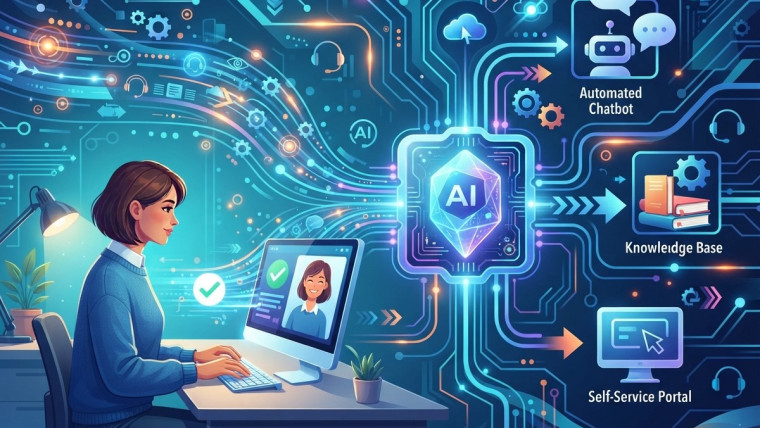
A standalone chatbot may provide basic answers, but integration can significantly expand its usefulness. Connecting the chatbot with customer data, support systems, calendars, knowledge bases, or CRM platforms allows it to perform more relevant tasks. This can reduce the need for employees to switch between multiple systems when handling routine customer requests.
How Chatbot Technology Improves Productivity

Reducing Repetitive Questions
Many businesses receive similar questions repeatedly. Customers may ask about pricing, opening hours, product availability, delivery policies, account procedures, or service features.
An integrated chatbot can provide answers to these routine questions without requiring an employee to respond manually every time. This reduces repetitive workload and allows support teams to focus on more complex requests.
Supporting Employees
Chatbots do not necessarily need to replace human employees. They can function as support tools that handle initial interactions and routine requests.
When a conversation requires human assistance, the chatbot can collect relevant information before transferring the interaction to an employee. This can help representatives begin conversations with more context.
The Role of Live Chat Automation
Live chat automation combines automated conversational support with live customer service. Instead of forcing every visitor to wait for a representative, automated systems can respond immediately and identify whether a conversation requires human assistance.
This approach can help businesses manage high volumes of inquiries while maintaining access to human support when necessary.
Providing Immediate Responses
Customers often expect quick answers when they contact a business online. Delays can create unnecessary friction, particularly when the question is simple and the answer is readily available.
Automated chat responses can provide immediate assistance at any time. This can improve the accessibility of customer support and reduce waiting periods for routine questions.
Transferring Complex Conversations
Automation works best when businesses establish clear rules for human escalation. If a customer has a complicated issue, complaint, technical problem, or sensitive request, the chatbot can transfer the conversation to a human representative.This creates a hybrid support model where automation handles simple interactions and employees manage cases requiring deeper attention.
How Chatbot Automation Reduces Operational Work
Chatbot automation can streamline repetitive business processes by allowing software to perform predefined conversational tasks. Instead of manually collecting information or directing customers through simple procedures, businesses can automate parts of these workflows. The amount of automation depends on the chatbot’s capabilities and its connections with other business systems.
Automating Lead Collection
Chatbots can ask visitors basic qualifying questions and collect contact information. This can help businesses organize incoming leads before they reach a sales representative.
For example, a chatbot can ask about a customer’s requirements, budget range, service interest, or preferred contact method. The collected information can then be transferred to a CRM or lead management system.
Automating Appointment Requests
Service-based businesses can connect chatbots with scheduling systems. Customers can ask about available appointments and provide the information required to arrange a booking. This can reduce administrative work and make the scheduling process more convenient for customers.
Improving Customer Support Efficiency
Customer support teams can become overwhelmed when inquiry volumes increase. Chatbot integration provides an additional support layer that can handle routine interactions before they reach human agents. This can help support teams prioritize complex cases and organize customer conversations more effectively.
Providing 24/7 Assistance
Unlike traditional support teams with fixed working hours, automated chat systems can remain available around the clock. Customers can receive basic information outside normal business hours.
24/7 availability does not mean every issue can be resolved automatically. Instead, it provides customers with immediate access to information and a pathway for escalation when human support is required.
Supporting Frequently Asked Questions
Businesses can build chatbot knowledge bases around frequently asked questions. When customers ask common questions, the chatbot can provide predefined or AI-generated answers based on approved information.
Keeping this information accurate is important because outdated chatbot responses can create confusion and increase support workload.
Enhancing Sales and Lead Generation
Chatbot integration can also support sales teams by engaging website visitors and guiding them through early stages of the buying process.
A chatbot can answer product questions, explain services, recommend relevant information, and collect contact details from interested visitors.
Guiding Customers Through the Buying Journey
Potential customers may need additional information before making a purchase. A chatbot can provide quick answers about features, pricing, availability, or service options.
This can reduce friction during the decision-making process and help customers find relevant information without navigating multiple pages.
Qualifying Potential Leads
Sales teams can spend considerable time reviewing incoming inquiries. Chatbots can help organize this process by asking predefined qualification questions.
The resulting information can help sales representatives understand a prospect’s basic requirements before beginning a direct conversation.
Improving Internal Business Operations

Internal chatbots can help employees find information, access documentation, answer routine policy questions, or complete simple requests.
Employee Information Access
Employees often need quick access to company information. An internal chatbot can provide a conversational interface for finding frequently requested information.
For example, employees may ask about internal procedures, technical documentation, company resources, or routine administrative processes.
Reducing Administrative Tasks
Some administrative processes involve repetitive questions and data collection. Chatbots can automate parts of these workflows and direct employees toward appropriate resources.
This can reduce unnecessary interruptions and allow teams to spend more time on their primary responsibilities.
Integrating Chatbots With Business Systems
The effectiveness of a chatbot often depends on how well it connects with other business tools. Integration with CRM, help desk, e-commerce, scheduling, analytics, and knowledge management systems can expand what the chatbot can accomplish. Businesses should identify the workflows that would benefit most before selecting integration options.
CRM Integration
Connecting a chatbot with a CRM can allow customer information and lead details to move into a centralized system. This can help sales and support teams maintain better records of customer interactions.
CRM integration can also support follow-up processes by making relevant conversation information available to authorized employees.
Knowledge Base Integration
A chatbot connected to an updated knowledge base can provide customers with relevant answers based on approved information.
Businesses should regularly review their knowledge sources to ensure chatbot responses remain accurate, current, and aligned with company policies.
Security and Data Considerations
Efficiency should not come at the expense of responsible data handling. Chatbots may process names, contact information, account details, customer questions, and other potentially sensitive information. Businesses should determine what data the chatbot needs and implement appropriate access controls.
Protect Customer Information
Only necessary information should be collected during chatbot interactions. Businesses should also establish appropriate security measures for storing and transferring customer data. Clear privacy practices can help customers understand how their information is handled.
Control Automated Responses
Businesses should define what chatbots are allowed to answer and what situations require human intervention. Clear limitations can reduce the risk of inappropriate or inaccurate automated responses.
Human oversight remains important, particularly when chatbot conversations involve complex customer issues or sensitive information.
Measuring the Impact of Chatbot Integration
Businesses should measure chatbot performance using metrics that reflect their specific objectives. Simply counting the number of chatbot conversations may not provide enough information about whether the system is improving efficiency.
Useful measurements can include response time, automated resolution rate, escalation rate, customer satisfaction, lead collection, and employee workload.
Track Resolution Rates
Resolution rates can help businesses understand how many customer requests are handled without human intervention.
However, a high automation rate is not automatically a sign of success. Businesses should also examine whether customers receive accurate and useful answers.
Monitor Customer Satisfaction
Customer feedback can reveal whether automated interactions are meeting expectations. Surveys, ratings, conversation reviews, and support feedback can help identify areas for improvement.
Businesses can use these insights to update chatbot responses, improve escalation rules, and refine customer journeys.
Best Practices for Successful Chatbot Integration
Successful implementation requires more than installing a chatbot. Businesses should begin with clearly defined objectives and select use cases where automation can provide genuine value. The chatbot should complement human employees rather than create additional friction for customers.
Start With Simple Use Cases
Businesses can begin by automating frequently asked questions, basic information requests, lead collection, or appointment inquiries. These use cases are often easier to monitor and optimize. Once the system performs reliably, businesses can consider expanding it to more complex workflows.
Provide a Clear Human Handoff
Customers should have a clear path to human support when automation cannot solve their problem. Escalation options can help prevent frustration and ensure complex cases receive appropriate attention. The handoff should also provide human representatives with relevant conversation context whenever possible.
The Future of Chatbot Integration

The future is likely to focus not only on answering questions but also on completing useful tasks within connected business environments. Businesses that approach automation strategically can use chatbots to reduce repetitive work while maintaining human involvement where it provides greater value.
Conclusion
Chatbot integration can improve business efficiency by automating repetitive conversations, supporting customer service, assisting sales teams, streamlining workflows, and providing faster access to information.
Modern Chatbot technology allows businesses to create more capable conversational experiences, while Live chat automation can combine immediate automated assistance with human support. At the same time, Chatbot automation can reduce repetitive operational tasks across customer-facing and internal workflows.
The most effective approach is not to automate every interaction. Instead, businesses should identify repetitive processes where automation can provide clear value while maintaining human support for complex or sensitive situations. With appropriate integration, monitoring, security practices, and continuous optimization, chatbots can become a practical component of a broader strategy for improving productivity and customer experience.
Frequently Asked Questions
1. What is chatbot integration?
Chatbot integration is the process of connecting a chatbot with websites, CRM systems, customer support platforms, messaging channels, scheduling tools, or other business systems.
2. How does chatbot integration improve business efficiency?
It can reduce repetitive tasks, provide faster responses, automate routine workflows, support employees, and help businesses manage customer inquiries more efficiently.
3. What is chatbot technology?
Chatbot technology enables software to communicate with users through conversational interfaces. Modern systems can use artificial intelligence and natural language processing to understand and respond to user requests.
4. What is live chat automation?
Live chat automation uses automated conversational tools to handle routine customer interactions while allowing human representatives to take over when more complex assistance is required.
5. Can chatbots reduce customer support workload?
Yes. Chatbots can handle repetitive questions, provide basic information, collect customer details, and perform other routine tasks, potentially reducing the number of interactions that require manual handling.
6. Can chatbot integration help generate leads?
Yes. Chatbots can engage website visitors, ask qualifying questions, collect contact information, and transfer relevant lead details to sales or CRM systems.
7. Can chatbots provide 24/7 customer service?
Chatbots can provide automated assistance outside normal business hours. However, businesses may still need human representatives for complex issues that cannot be appropriately handled through automation.
8. How does chatbot automation help employees?
Chatbot automation can reduce repetitive administrative and communication tasks. Internal chatbots can also help employees find information and access frequently requested resources.
9. What systems can be integrated with chatbots?
Depending on the available technology, chatbots can integrate with websites, CRM platforms, help desks, e-commerce systems, scheduling tools, knowledge bases, analytics platforms, and messaging channels.
10. What should businesses consider before integrating a chatbot?
Businesses should consider their objectives, target use cases, integration requirements, data security, chatbot accuracy, human escalation processes, customer experience, and performance measurement before implementation.





One Reply to How Chatbot Integration Improves Business Efficiency
How AI Virtual Assistants Improve Time Management
How Business Chatbots Reduce Customer Support Workloads
How Lead Generation Chatbots Improve Sales Opportunities
How Chatbot Integration Improves Business Efficiency